AccessBlog.net

News, links, downloads, tips and tricks on Microsoft Access and related

About Me Search
Alex
Name:Alex Dybenko

Location:Moscow, Russia

Wednesday, May 12, 2010

Access 2010 Runtime

Download Access 2010 Runtime (in 13 languages), Access Database Engine Redistributable (both in 32 and 64 bit versions!) and Source Code Control Add-in for Access.

via The official blog of the Microsoft Access product team

Labels:

Friday, April 02, 2010

API calls in 64bit VBA

With Office 2010 you can install 32 and 64 bit versions of Access (and other Office applications also). 64bit version generally uses same VBA as 32bit, but API declarations will be bit different. Here some links to understand the difference and right way to write code on 64bit platform:

http://www.utteraccess.com/forum/office-2010-x64-bit-qu-t1914261.html

http://gpgonaccess.blogspot.com/2010/03/work-in-progress-and-64-bit-vba.html

http://www.jkp-ads.com/articles/apideclarations.asp

Labels:

Thursday, April 01, 2010

Fall in love with your data the Access way

See video with Teresa Hennig and Arvin Meyer discussing Access 2010

Labels: ,

Thursday, December 17, 2009

RecordsetClone in Access 2007 forms

I did not use Access 2007 much, most of my customers still on Access 2003, which works fine. But recently, when I tested my applications on Access 2010, I found that calculating number of records in subform using RecordsetClone.RecordCount property produces #Name error. Talking about Northwind’s Orders form expression on main form’s textbox is:

=[Orders Subform].[Form].[RecordsetClone].[RecordCount]

Allen Brown mentioned it as a bug. But looks like it is not, this is a feature! Beta Engineer told me that RecordsetClone.RecordCount is replaced with Count() function (was usable in previous Access versions), which you can use it as following.  You have to add an expression field “txtCount” in the subform footer and set the control source to =Count(1). Then on the mainform add a textbox that refers to this subform control =[Orders Subform].[Form]![txtCount]. Same way like you deal with Sum() in subforms. Count() is something like Count in SQL, so in sample above 1 is a field number, and you can also use Count(*).
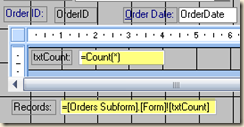
image

Count() also works in Access 2003, and would be good idea to start using in instead of RecordsetClone.RecordCount to make your applications compatible to newer Access versions.

Labels: , ,

Thursday, November 19, 2009

Get Office 2010 beta

Office 2010 beta is available now!

Labels:

Friday, November 13, 2009

Office 2010: Developer References

Download provides developer Help content for the Office 2010 Beta release, also Access 2010 Developer Reference.

Labels:

Thursday, October 29, 2009

Access 2010 in action

Check out this great video - Access 2010 and Outlook style calendar running in a browser by Albert D. Kallal, Access MVP. Application was developed in Access and running in web browser using SharePoint Access services. Well done, Albert!

Labels:

Wednesday, October 21, 2009

Access 2010 - Access Services

Now it is official - Access Services for Sharepoint 2010. Ryan McMinn and Clint Covington opens curtain.

Labels:

Sunday, July 12, 2009

New Office 2010 movie

Old movie was replaced with new one:

You can also look as one more movie from Access MVP Albert Kallal, I like this one!

Labels:

Thursday, May 14, 2009

Office 2010

Here the movie. No control or no Ctrl+Alt+Delete?

Labels:

Sunday, March 22, 2009

Access x64?

According to Ed Bott research next Access version, Access 14, will be also on x64 platform. Don’t know if we get performance improvement, but some problems can arise with external libraries and controls. 64-bit activex controls?? Looking forward to try see x64 version….

Labels: