AccessBlog.net

News, links, downloads, tips and tricks on Microsoft Access and related

About Me Search
Alex
Name:Alex Dybenko

Location:Moscow, Russia

Wednesday, November 23, 2011

Multi-value Fields - Appending / Updating with query

Access 2007 introduced Multi-value fields (MVF), some people like it, some – hate it. I personally like UI for MVF in Access, but don't like realization in table level – you can't get access to  junction table of MVF. Anyway - any Access developer have to learn working with it, sooner or later, and here something your can look at.

image

A.D. Tejpal, Access MVP, has published Multi-value Fields - Query Based Solution For Bulk Appending / Updating sample database, which shows several techniques to work with MVF.

Labels: ,

Friday, April 22, 2011

New Access Database template

I have already blogged about new database template in Access, but original post on team blog was gone (thanks to my reader motioning this!). Jeff Conrad has it in his Access 2007 FAQ. The idea is: if you want to have new database created with predefined settings – you can make a Blank.accdb database and put it in Program Files\Microsoft Office\Templates\1033\Access.

And one more link to Office online article: Create a custom blank template.

Same applies to Access 2010.

Labels: ,

Monday, January 10, 2011

How to export table’s rich text to Word

In Access 2007 and 2010 you can set Memo field property Text format to Rich Text and start entering formatted text there.

image

But if you export that table to Word RTF file – you lost all formatting. In order to keep formatting – make an export to HTML Document, and then you can open it in Word, and perhaps save as RTF.

image

Labels: , ,

Tuesday, November 30, 2010

Application for Access 2003 and 2007+: Substitute missing class in reference with custom MDE.

This trick I learned from Graham Mandeno, Access MVP. Here we talk about Ribbon interface, but same trick can be used for other libraries.

In Access 2007 command bars were replaced with Ribbon. You can develop application which can run on 2003 and 2007/2010, but if you build custom menu bar or command bar for Access 2003, when running in A2007+ the menu bar gets buried in the "Add-Ins" ribbon. So you would like to create a proper ribbon UI which would appear if the MDB/E is opened in A2007+, and still have the old-style CommandBar UI appear if opened in A2003.

You can create the ribbon for 2007/10, but the callbacks fail to compile in A2003 because class objects such as IRibbonControl do not exist in the Office11 object library. You can try to declare all instances "As Object" and that keeps A2003 happy, but then the ribbons don't work in A2007+. Let us give word to Graham:

What I have done is create a very small MDE containing nothing but class modules for IRibbonControl and IRibbonUI, each with the necessary properties and methods declared as empty procedures. The class modules need to have instancing set to “PublicNotCreatable”. Then I added a reference to the MDE to my project, ensuring that it is last in the list – BELOW the reference to MSO.DLL.

Now, when running on A2007+, the code picks up the reference from the Office 12/14 object library and works fine. On A2003 it finds it in the dummy MDE and compiles OK (of course, the actual code is never called in A2003).

In case anyone else is interested, here are the three class modules (I don’t actually use IRibbonExtensibility, but I included it for completeness):

' Class: IRibbonControl

Option Explicit

Public Property Get Context() As Object

End Property

Public Property Get Id() As String

End Property

Public Property Get Tag() As String

End Property

================================

' Class: IRibbonUI

Option Explicit

Sub Invalidate()

End Sub

Sub InvalidateControl(ControlID As String)

End Sub

================================

' Class: IRibbonExtensibility

Option Explicit

Public Function GetCustomUI(RibbonID As String) As String

End Function

================================

Labels: , ,

Saturday, June 05, 2010

New Free Ribbon and Access 2010 Navigation Form Tools

from Anthony D'Ambra

1. Access2007 Ribbon Builder and Editor for Microsoft© Access 2007 BETA builds and maintains Access 2007 and Access 2010 Custom Ribbons. It is a simple yet sophisticated tool for building custom ribbonbars using XML files. The ribbon being built is displayed as the active RibbonBar. You use the treeview representation of the ribbon to navigate and build the ribbon by adding, editing, copying, pasting, and deleting controls. http://accessextra.blogspot.com/2010/03/new-ezy-access-ribbonx-builder-editor.html

2. Easily Migrate Legacy Access Switchboards to the Access 2010 Navigation Form. In Access 2010 the venerable Native Switchboard Manager has been retired. The old Switchboard form has been replaced by a cool web 2.0 style Navigation Form using a tabs paradigm of up to two levels. The Navigation Form Control and Button controls cannot be created in code, so there is a degree of hard-coding involved. I saw the opportunity to ease the design process by adapting the legacy Switchboard Items table and porting it to the new Navigation Form. I have created a demonstration Access 2010, which can be downloaded from the url below. The code can be used freely in your applications 'as is'. All the required code is behind the custom Navigation Form, which is pre-built with a generic two-level tabs control: 8 level one options and each option having 8 buttons, which are populated at run-time from the Switchboard Items table, using custom code adapted from the Access 2003 vba module behind the native Switchboard form. http://accessextra.blogspot.com/2010/04/in-access-2010-venerable-native.html

3. The Access Switchboard to Ribbon Converter Wizard in just two mouse-clicks turns your legacy Access Switchboard (as built by the native Access Switchboard Manager) into a fully functional Ribbon Switchboard. http://accessextra.blogspot.com/2010/05/access-switchboard-to-ribbon-converter.html

Labels: ,

Wednesday, March 17, 2010

Developer's Ribbon for Access 2007

If you found that using Access 2007 ribbon is not an easy task – try this replacement for standard Access ribbon - Developer's Ribbon.

Labels:

Thursday, March 04, 2010

Export Access 2007 form to XML

This tip I just learned from Jeff Conrad, which can be useful when you need extract images, used in form’s theme:

In 2007 right-click on a form in Navigation Pane that has a 2007 theme you like

Select the option to export the form to XML

Select a destination easy to find

When prompted, make sure to select to export the "Presentation of your data (XSL)"

Navigate to where you exported and you'll find a folder called images

In that folder are all the images for the form. You can just grab them there instead of using SnagIt if you want.

Labels:

Wednesday, January 13, 2010

How to Hide Access 2007 Office Button and Ribbon

If you want to hide Access 2007 Office button and Ribbon  from your Access application – add the following code so it executes at startup.

DoCmd.ShowToolbar "Ribbon", acToolbarNo

via MDBMakers.com

Labels:

Thursday, December 17, 2009

RecordsetClone in Access 2007 forms

I did not use Access 2007 much, most of my customers still on Access 2003, which works fine. But recently, when I tested my applications on Access 2010, I found that calculating number of records in subform using RecordsetClone.RecordCount property produces #Name error. Talking about Northwind’s Orders form expression on main form’s textbox is:

=[Orders Subform].[Form].[RecordsetClone].[RecordCount]

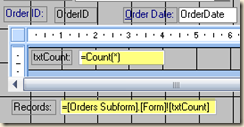
Allen Brown mentioned it as a bug. But looks like it is not, this is a feature! Beta Engineer told me that RecordsetClone.RecordCount is replaced with Count() function (was usable in previous Access versions), which you can use it as following.  You have to add an expression field “txtCount” in the subform footer and set the control source to =Count(1). Then on the mainform add a textbox that refers to this subform control =[Orders Subform].[Form]![txtCount]. Same way like you deal with Sum() in subforms. Count() is something like Count in SQL, so in sample above 1 is a field number, and you can also use Count(*).

image

Count() also works in Access 2003, and would be good idea to start using in instead of RecordsetClone.RecordCount to make your applications compatible to newer Access versions.

Labels: , ,

Friday, April 17, 2009

Access will export reports to Excel … again!

Service Pack 2 for the 2007 Microsoft Office System will bring back export to Excel feature for Access reports, finally! Thanks to Bob Larson, Access MVP, who pointed me to this link! Check out other SP2 improvements.

Labels: ,

Thursday, September 11, 2008

Use sandbox mode in Access 2007

Thanks to Brent Spaulding, Access MVP, who pointed to "Use sandbox mode in Access 2007" article, explaining how to enable/disable sandbox mode, which blocks unsafe expressions. In case you using Vista 64 - this key located find under:

HKEY_LOCAL_MACHINE\SOFTWARE\Wow6432Node\ Microsoft\Office\12.0\Access Connectivity Engine\Engines

Labels: